Yesterday I converted a patent specification to XML using PASAT. I've done this maybe a dozen times now for various patent applications, with varying levels of difficulty and frustration. But lately I had been having fairly good luck ...
I was done editing the specification, and saved it, and closed PASAT. Later I re-opened PASAT and re-opened the S4W file. And I received the following error message:

I then clicked on "OK" and a new error message appeared:
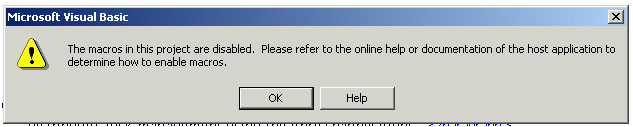
The result of all this is that PASAT did not work properly at all. I was unable to edit my patent specification, and "save specification" was grayed out so that I could not save the specification.
I phoned up the Patent Office Electronic Business Center Help Desk. The fellow who answered kept trying to tell me I had made a mistake and stored the file as a "Word" file (using "file" and "save") rather than storing it as an S4W file (using "save specification"). After some difficulty I managed to make understood what the problem was that I was seeing.
It turns out this problem has only started happening in the past few days. The way to fix this problem, I am told, is to close the document (whilst leaving PASAT open), then click "tools" and "macro" and "security". The dialog box that appears permits the user to select a security level. The default is "high", and the other choices are "medium" and "low." The Patent Office explains that the only way to fix this problem is to select "low:"
Low (not recommended). You are not protected from potentially unsafe macros. Use this setting only if you have virus scanning software installed, or if you are sure all documents you open are safe.
Then you close PASAT and restart it, and then you can edit and revise S4W files again.
I suspect that the developer who wrote PASAT did it using a lot of macros, and then signed them with a digital signature that expired a few days ago.
So if I want to be able to edit or revise an S4W file, I have to make my computer volnerable to Word macro viruses. Supposedly the USPTO is working on getting this fixed. Probably it means having the macros re-signed with a new digital signature. Once it is fixed, then we can all change our macro security level back to "high."